Best Results Page
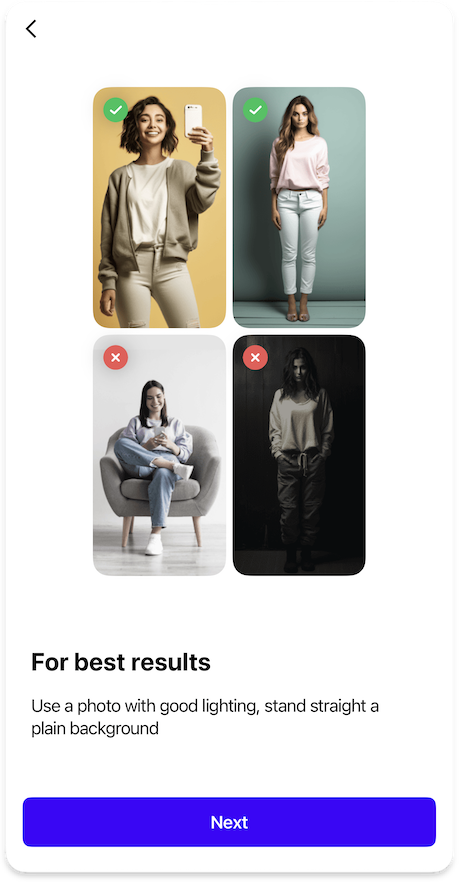
Sets up an optional page showing examples of photos that yield the best try-on results.
OnboardingBestResultsPageFeature {
  images {
    onboardingBestResultsGood: List<Image> // (1)!
    onboardingBestResultsBad: List<Image> // (2)!
  }

  icons {
    onboardingBestResultsGood24: Icon // (3)!
    onboardingBestResultsBad24: Icon // (4)!
  }

  strings {
    onboardingBestResultsPageTitle: String | null // (5)!
    onboardingBestResultsTitle: String // (6)!
    onboardingBestResultsDescription: String // (7)!
  }

  styles {
    reduceOnboardingBestResultsShadows: Bool // (8)!
  }
}
- List of exactly 2 example photos that demonstrate optimal conditions for virtual try-on results.
- List of exactly 2 of example photos showing conditions that may lead to suboptimal try-on results.
- Icon displayed next to good example photos to indicate positive results.
- Icon displayed next to bad example photos to indicate potential issues.
- Optional title for the "Best Results" page at the top of the screen.
- Main title displayed above the example photos section.
- Descriptive text explaining what makes a good photo for virtual try-on.
- Controls whether to reduce shadow effects on example photos for better visibility.
Deprecated
Examples of good source photos are now included into the Image Picker, so we recommend disabling this slide to avoid overwhelming the user with onboarding
{"Bool": "/sdk/developer/definitions/#bool", "Icon": "/sdk/developer/definitions/#icon", "Image": "/sdk/developer/definitions/#image", "List": "/sdk/developer/definitions/#list", "String": "/sdk/developer/definitions/#string", "null": "/sdk/developer/definitions/#optional"}