Uploads History
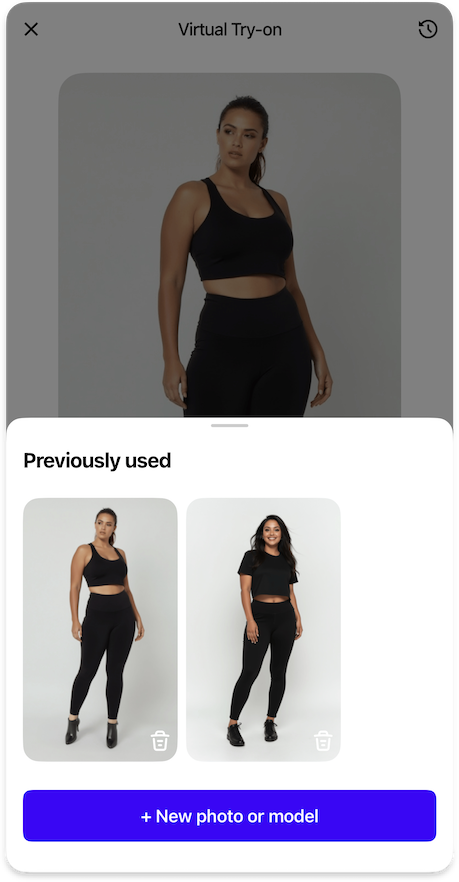
Configuration for managing and reusing previously uploaded images.
ImagePickerUploadsHistoryFeature {
  strings {
    uploadsHistoryButtonNewPhoto: String // (1)!
    uploadsHistoryTitle: String // (2)!
    uploadsHistoryButtonChangePhoto: String // (3)!
  }

  styles {
    changePhotoButtonStyle: ComponentStyle // (4)!
  }

  dataProvider: BuiltIn | Custom {
    uploadedImages: Observable<List<InputImage>> // (5)!
    addUploadedImages: Callback(List<InputImage>) // (6)!
    deleteUploadedImages: Callback(List<InputImage>) // (7)!
    selectUploadedImage: Callback(InputImage) // (8)!
  }
}
- Text label for the button to upload a new photo.
- Title text displayed at the top of the uploads history bottom sheet.
- Text label for the button to change the currently selected photo.
- Visual style for the change photo button, either primary (solid) or blurred (with optional outline).
- Observable collection of images previously uploaded by the user, with most recent first.
- Callback to add new images to the uploads history.
- Callback to remove images from the uploads history.
- Callback to move a selected image to the top of the history when reused.
Input Image
InputImage {
    id: String // (1)!
    url: String // (2)!
    ownerType: OwnerType // (3)!
}
- A unique string identifier assigned to the image by the Aiuta API, ensuring each image can be distinctly recognized and referenced within the system.
- The URL pointing to the location of the image resource, which can be accessed and retrieved by the SDK to present in the UI.
- The type of the image owner .
Input images used in the Aiuta SDK for try-on sessions can either be uploaded by users, such as photos taken with their camera or selected from their gallery, or they can be predefined model images provided by Aiuta.
Owner Type
enum OwnerType {
    user // (1)!
    aiuta // (2)!
}
-
Image uploaded or generated by the user (using a camera or from a gallery).
This image belongs to the user. When the user removes the image from the history, it may be deleted from the storage as well.
-
Image of the model provided or generated by the Aiuta.
This image could be linked to the user history, but it is not owned by the user, and can not be deleted from the storage, only unlinked from the user's history in case of removing.
Owner type primarily determines the source of origin of the image — whether it was generated by the user as a result of any chain of operations from upload to generation, possibly including re-generation. Alternatively, the image is not associated with the user's personal data and does not belong to them. This allows different approaches to be taken when deleting images from the history.
Sequence Diagrams
The sequence diagram of removing images from the user's history using custom data providers.
sequenceDiagram
    autonumber
    actor USR as ⠀<br>User
    participant APP as Your<br>App
    participant BE as Your<br>Backend
    participant SDK as Aiuta<br>SDK
    participant API as Aiuta<br>Backend
    participant GS as Storage
    note over GS: Aiuta or Yours

    USR->>SDK: Select image(s) to delete
    activate SDK

    SDK-->>USR: Show activity indicator
    SDK->>APP: Call deleteUploadedImages / deleteGeneratedImages
    activate APP
    APP->>BE: Delete images
    activate BE

    opt user owned images
        alt Aiuta storage
            BE->>API: Delete images by ID
            activate API
            API-xGS: Delete files
            API-->>BE: Deletion response
            deactivate API
        else your storage
            BE-xGS: Delete files
        end
    end
    BE->>BE: Remove images from the user's records

    BE-->>APP: Acknowledge deletion
    deactivate BE

    APP-->>SDK: Acknowledge deletion
    SDK-->>USR: Hide activity indicator
    APP-->>SDK: Update observable history lists
    deactivate APP

    SDK->>SDK: Update history display
    SDK-->>USR: Show updated history
    deactivate SDK
Important: Owner Type Handling
When deleting images from the history, the behavior depends on the ownerType
userimages can be deleted from storage and removed from historyaiutaimages should only be unlinked from user history, not deleted from storage
This ensures that shared model images remain available for other users while user-generated content can be properly cleaned up
The sequence diagram of adding newly uploaded and generated images to the user's history using custom data providers.
sequenceDiagram
    autonumber
    actor USR as ⠀<br>User
    participant APP as Your<br>App
    participant BE as Your<br>Backend
    participant SDK as Aiuta<br>SDK
    participant API as Aiuta<br>Backend
    participant GS as Storage
    note over GS: Aiuta or Yours

    APP->>SDK: Provide configuration with observable data providers
    activate SDK
    SDK-->>SDK: Subscribe to observable<br>history lists changes
    deactivate SDK

    Note over SDK,API: After successful try-on generation
    activate SDK
    SDK->>APP: Call addUploadedImages / addGeneratedImages
    APP->>BE: Link new images<br>to the user's history
    APP-->>SDK: Update observable data providers
    SDK->>SDK: Update local history display
    deactivate SDK

    USR->>SDK: Tap History Button / Change photo
    activate SDK
    SDK-->>USR: Display History Data
    Note over SDK,USR: Shows list of generated / uploaded<br>images with most recent first

    opt cache not exitst/expired
        SDK->>GS: Get images by the URL
        GS-->>SDK: Images data
        SDK->>SDK: Cache images
        deactivate SDK
    end